The smartphone interface is experiencing its most fundamental transformation since the introduction of touchscreens. Voice is rapidly displacing visual and touch interactions as the primary mode of human-computer communication. By 2026, voice user interfaces have matured from experimental features into essential components of competitive mobile applications, fundamentally changing how users accomplish tasks and access information.
The Convergence Driving Voice Adoption
Three critical developments are converging to make 2026 the breakthrough year for voice interfaces. First, large language models have made voice assistants genuinely intelligent for the first time. Unlike earlier systems limited to rigid command structures, modern voice interfaces understand context, maintain conversation threads, and respond naturally to ambiguous requests.
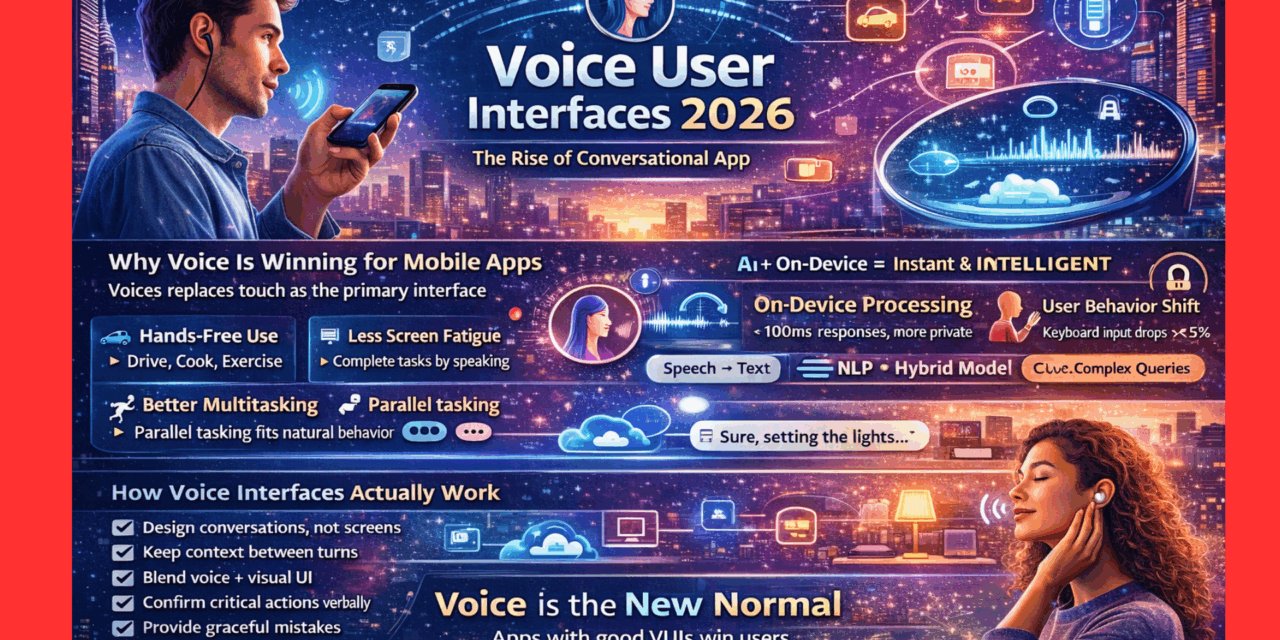
Second, hardware capabilities have reached necessary performance thresholds. On-device processing enables voice recognition without cloud dependencies, reducing latency to sub-100 millisecond levels that feel genuinely conversational. Users no longer tolerate the awkward pauses that plagued earlier voice systems—they expect instant responses that match human conversation patterns.
Third, user behavior has shifted dramatically. Data shows that among mature users of advanced voice tools, keyboard usage drops below 5% as voice accounts for roughly 75% of all input. This behavioral transformation demonstrates that when voice interfaces work well, users overwhelmingly prefer them to traditional input methods. The convenience of speaking naturally rather than typing or tapping through menus creates experiences users actively seek rather than merely tolerate.
Why Voice Wins for Mobile
Voice interfaces solve fundamental mobile use case challenges that touchscreens struggle with. Hands-free operation enables smartphone functionality while driving, cooking, exercising, or carrying items—situations where traditional interfaces are impractical or dangerous. This accessibility advantage extends beyond convenience into necessity for many daily activities.
Screen fatigue has become a widely recognized issue as digital device usage increases. Voice interfaces provide complete control without requiring visual attention, reducing eye strain while maintaining productivity. Users can accomplish tasks, access information, and control devices without adding to their daily screen time, a benefit particularly valuable for those seeking healthier technology relationships.
Multitasking capabilities improve dramatically with voice interfaces. Users can query information, control smart devices, or dictate messages while simultaneously engaged in other activities. This parallel processing aligns better with human behavior patterns than serial touchscreen interactions requiring dedicated attention and physical manipulation.
The natural interface advantage is perhaps most compelling. Humans have refined speech communication for millennia—it’s our most practiced and intuitive interaction mode. Voice interfaces leveraging this natural capability reduce learning curves and lower barriers to technology adoption, particularly for elderly users or those with physical limitations that make traditional interfaces challenging.
Technical Architecture Enabling Natural Conversation
Modern voice user interfaces employ sophisticated technical stacks combining multiple AI technologies. Automatic speech recognition converts spoken words into text with accuracy exceeding 95% in optimal conditions. Natural language processing interprets meaning and intent from transcribed speech, understanding context, handling ambiguity, and extracting actionable information from conversational input.
Text-to-speech synthesis generates natural-sounding responses that maintain conversational flow. Modern systems produce voices indistinguishable from human speech, with appropriate intonation, pacing, and emotional expression. The uncanny valley that made earlier synthetic voices uncomfortable has been crossed, enabling genuinely pleasant auditory experiences.
The hybrid architecture approach is becoming standard implementation strategy. Simple commands and frequent queries process entirely on-device, ensuring instant response times and privacy protection. Complex reasoning, deep knowledge retrieval, and creative generation tasks leverage cloud resources when necessary, balancing performance against capability requirements.
This split between local and cloud processing mirrors human cognition’s fast reflexive responses and slow deliberate reasoning. For automotive applications, robotics control, and safety-critical functions, near-instantaneous on-device decisions are non-negotiable. For research queries, content creation, and analytical tasks, cloud-processing capabilities justify minor latency increases.
Professional mobile app development services increasingly prioritize voice interface implementation as businesses recognize strategic advantages. Applications incorporating well-designed voice capabilities differentiate themselves in crowded markets while improving accessibility and user satisfaction metrics.
Implementation Strategies for Developers
Building effective voice user interfaces requires different design thinking than traditional visual applications. Conversation design becomes the primary UX discipline, focusing on dialogue flow, error handling, and graceful degradation when recognition fails. Unlike visual interfaces where users see all available options, voice interfaces must guide users through possibilities verbally without overwhelming them with choices.
Context awareness separates good voice interfaces from great ones. Systems must remember conversation history, understand references to previously mentioned entities, and maintain state across multiple turns. Users expect voice assistants to function like human conversation partners who recall earlier discussion points and build on established context.
Error recovery mechanisms are crucial for maintaining user trust. Voice recognition isn’t perfect, and misunderstandings will occur. Well-designed interfaces detect confusion, clarify ambiguous requests, and provide helpful correction pathways rather than failing silently or responding inappropriately to misrecognized input.
Multi-modal design principles recognize that voice shouldn’t completely replace visual and touch interfaces but rather complement them. The most effective implementations combine voice with visual feedback, allowing users to speak commands while seeing confirmations, corrections, and additional options on screen. This hybrid approach leverages the strengths of each interaction modality.
Privacy and Security Considerations
Voice interfaces raise legitimate privacy concerns that developers must address transparently. Always-listening devices create surveillance anxieties, particularly given high-profile security breaches and corporate data misuse scandals. Applications must clearly communicate when listening is active, what data is collected, how long it’s retained, and who has access.
On-device processing provides significant privacy advantages by ensuring sensitive voice data never leaves user devices. Local speech recognition, on-device language models, and edge computing capabilities enable sophisticated voice functionality without cloud transmission of potentially sensitive conversations.
Voice biometric security is emerging as authentication mechanism leveraging unique vocal characteristics for identity verification. This passwordless approach provides convenient security but requires careful implementation to prevent spoofing attacks and ensure accessibility for users whose voices change due to illness or aging.
Regulatory compliance requirements vary globally, with different jurisdictions imposing distinct rules around voice data collection, storage, and usage. Applications serving international audiences must navigate complex regulatory landscapes, implementing appropriate protections for each market’s requirements.
Industry-Specific Applications
Healthcare applications leverage voice interfaces for hands-free medical record access, dictated patient notes, and symptom reporting. Doctors can query patient histories, order tests, and document encounters while maintaining focus on patients rather than computers. Voice-enabled telemedicine platforms facilitate remote consultations that feel more natural than text-based alternatives.
Automotive integration represents perhaps the most critical voice interface application. Drivers require eyes-free, hands-free vehicle control for safety. Voice interfaces enable navigation adjustments, climate control, entertainment selection, and communication without dangerous visual or manual distraction. As autonomous vehicles evolve, voice becomes the primary human-vehicle interaction modality.
Smart home control through voice commands has achieved mainstream adoption. Users appreciate unified voice control across diverse connected devices—lighting, thermostats, security systems, appliances—without juggling multiple apps or physical controls. Voice interfaces create seamless smart home experiences that justify connected device investments.
Accessibility applications demonstrate voice interfaces’ transformative potential for users with disabilities. Visual impairments, motor function limitations, or other conditions that make traditional interfaces challenging are mitigated through voice control. These implementations aren’t optional accessibility features but rather essential functionality enabling independence and digital participation.
Enterprise applications increasingly incorporate voice for productivity enhancement. Sales professionals dictate CRM updates while driving between appointments. Warehouse workers query inventory systems hands-free. Field service technicians access repair procedures while working on equipment. Voice enables productivity in situations where traditional interfaces would require work interruptions.
Wearable Integration and Future Form Factors
Wearable devices represent ideal voice interface platforms. AirPods, smart glasses, and similar form factors provide personal, always-available voice access without requiring users to retrieve and unlock smartphones. This ambient availability transforms voice from deliberate action into seamless component of daily activities.
The debate between audio-only wearables versus heads-up displays reflects different philosophical approaches. Headphones prioritize simplicity, battery life, and social acceptability—nobody knows you’re conversing with AI. Glasses add visual context through glanceable information that complements voice input and output, though at the cost of increased complexity and social friction.
Emerging form factors will further diversify voice interface deployment. Screenless devices, environment-embedded systems, and entirely new product categories will leverage voice as primary interaction modality. The smartphone may evolve into voice-first companion device rather than visual-primary computing platform.
Challenges and Limitations
Despite rapid progress, voice interfaces face persistent challenges. Accent and dialect recognition remains imperfect, with systems trained primarily on standard dialects performing poorly for speakers with regional accents or non-native pronunciation patterns. This bias creates accessibility barriers and user frustration that undermines voice interface value propositions.
Ambient noise interference degrades voice recognition accuracy in real-world environments. Cocktail party problems—isolating target voices amid competing sounds—require sophisticated audio processing. Recent advances in spatial audio and source separation are addressing these limitations, but perfect performance across all acoustic environments remains elusive.
Social acceptability varies significantly by context. Speaking to devices feels natural in private settings but awkward in quiet public spaces like libraries, trains, or offices. This social friction limits voice interface utility in situations where users prefer discreet interactions.
Discoverability challenges plague voice interfaces that lack visual menus showing available functions. Users don’t know what’s possible unless explicitly taught or willing to experiment. Effective voice applications must balance feature richness against learnable command vocabularies, providing enough functionality to justify adoption without overwhelming users with complexity.
Best Practices for Voice UX Design
Successful voice user interfaces follow established design principles that maximize usability and user satisfaction. Conversations should feel natural, avoiding robotic or overly formal language that creates psychological distance between users and systems. Personality and warmth in voice responses improve engagement without sacrificing professionalism.
Confirmation strategies prevent errors from propagating through workflows. Critical actions should always include verbal confirmation requests before execution, while routine tasks can proceed with implicit confirmation and easy undo mechanisms.
Progressive disclosure manages complexity by introducing advanced features gradually as users demonstrate readiness. New users receive simple, guided experiences focusing on core functionality. Experienced users access sophisticated capabilities through natural conversation expansion rather than explicit mode switching.
Fallback mechanisms ensure graceful handling when voice recognition fails or user requests exceed system capabilities. Rather than dead-ending conversations with “I don’t understand” responses, well-designed systems offer alternatives, suggest similar available functions, or transition smoothly to human assistance when appropriate.
The Voice-First Future
The trajectory toward voice-primary interfaces appears irreversible. As natural language processing continues improving, latency decreases further, and integration expands across devices, voice will increasingly displace visual and touch interactions for common tasks. This shift doesn’t mean screens will disappear but rather that they’ll become complementary to voice rather than primary.
Application categories will stratify into voice-native and screen-primary experiences. Information access, simple transactions, and control functions will migrate predominantly to voice. Complex creative work, detailed analysis, and precise manipulation will remain screen-focused. Most applications will employ thoughtful combinations leveraging each modality’s strengths.
The developers and businesses investing seriously in voice interface capabilities today are positioning themselves for sustained competitive advantage. As voice becomes expected rather than optional, applications without well-implemented voice functionality will feel dated and lose users to more accessible alternatives.
Voice user interfaces represent more than technological novelty—they’re fundamental shifts in human-computer interaction aligning with how people naturally communicate. The question for application developers isn’t whether to implement voice capabilities but rather how quickly they can deliver voice experiences that users will prefer to traditional alternatives.