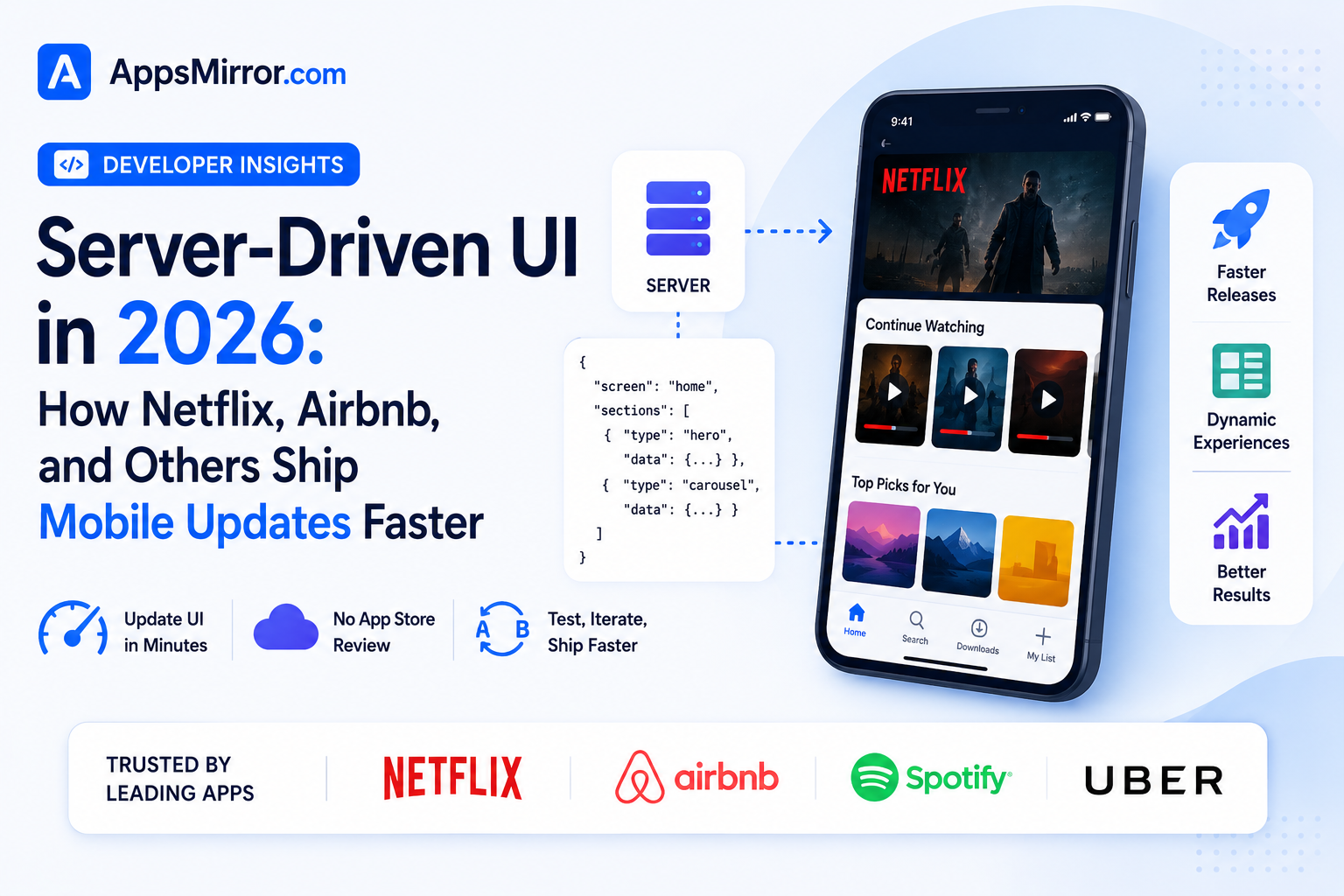
Every native mobile app faces the same structural bottleneck: even a trivial UI change, a reordered button, a new banner, a tweaked layout, requires a full build, app store review, and a rollout period before it reaches every user, a process that can take days even for the simplest fix. Server-driven UI, often abbreviated SDUI, addresses this directly by moving UI structure and content decisions from the client app into a backend response the app renders dynamically, letting teams change what users see without shipping a new app store release at all. Large consumer apps like Netflix and Airbnb have used variations of this pattern for years, and by 2026 the approach has matured enough that mid-sized teams are adopting it too. Here’s an honest look at where server-driven UI actually stands for mobile developers this year.
What Server-Driven UI Actually Solves
The core problem SDUI addresses is release velocity: a fully native UI baked directly into an app’s compiled binary can only change as fast as the app store review and update-adoption cycle allows, which realistically means days to weeks even for an urgent fix, since not every user updates immediately even after a new version ships. By instead having the client fetch a structured description of what to render, layout, components, content, from a backend endpoint, teams can change a screen’s structure, run an A/B test, or roll back a bad UI change within minutes rather than waiting on a full app release cycle. This has proven especially valuable for large e-commerce and streaming platforms like Netflix and Airbnb, where testing dozens of home-screen layout variations continuously would be operationally impossible if every variant required its own app store submission.
How It’s Actually Implemented in Production
Most production SDUI implementations don’t attempt to make the entire app dynamically server-rendered, that level of flexibility tends to introduce real performance and complexity costs, but instead apply the pattern selectively to specific high-churn screens like a home feed, a promotional banner area, or an onboarding flow that genuinely benefits from frequent iteration without a release cycle. The client app still ships with a native rendering engine capable of interpreting a defined set of component types, cards, carousels, buttons, text blocks, and the backend response simply describes which components to show, in what order, with what content and styling, rather than sending arbitrary executable code to run on the device. This selective approach keeps the core app experience fast and predictable while unlocking genuine flexibility specifically where product and marketing teams need to iterate quickly.
The Real Tradeoffs Teams Are Navigating
The most consistently cited downside is added architectural complexity: building and maintaining a well-designed component schema, a rendering engine capable of interpreting it reliably, and the backend tooling to manage and version UI configurations represents real, ongoing engineering investment that a purely native screen simply doesn’t require. Debugging also gets genuinely harder, since a rendering bug might stem from the client’s interpretation logic, the backend’s configuration, or a mismatch between the two, rather than being isolated entirely to one codebase the way a native screen’s bug typically is. Offline behavior needs deliberate design as well, since a server-driven screen needs a sensible fallback when the device can’t reach the backend for the latest UI configuration, an edge case native UI doesn’t need to think about at all since everything ships baked into the app itself.
Should Your Team Actually Adopt It
For teams building large-scale consumer apps with frequent content or layout changes, a home feed, a promotional or merchandising surface, an onboarding flow under constant experimentation, server-driven UI remains a genuinely strong architectural investment in 2026, and the pattern has matured enough that solid open-source and commercial tooling now exists rather than every team needing to build a schema and renderer entirely from scratch. Smaller teams or apps with fairly stable, infrequently changing UI are unlikely to see a return on the added architectural complexity, since the release-velocity problem SDUI solves simply isn’t a significant pain point without a genuine need for frequent, rapid UI iteration. As with most specialized architectural patterns, the right question isn’t whether SDUI is good, it clearly is for the right use case, but whether a specific app’s screens actually change often enough to justify the real complexity the pattern introduces.
Looking at where server-driven UI actually stands after years of production use at companies like Netflix and Airbnb, the pattern has proven itself as a genuine, mature solution for a real and specific problem, shipping UI changes fast enough to support continuous experimentation, rather than a universal replacement for native UI development generally. The teams getting the most value from it are treating it as a targeted tool for specific high-churn surfaces, not as a wholesale architecture for an entire app, echoing a pattern that’s shown up repeatedly across other emerging mobile technologies this year, from on-device AI to shared Rust cores. As tooling continues to mature and more teams share their production experience, expect SDUI adoption to keep growing steadily among consumer apps with genuine iteration needs, without ever becoming the default choice for every kind of mobile app.
Conclusion
Server-driven UI has proven itself a genuinely valuable architectural pattern in 2026 for the specific problem it was built to solve, letting large consumer apps iterate on UI at a pace that a purely native, app-store-gated release cycle simply can’t match. It isn’t the right fit for every app, and the added complexity is real, but for teams building high-churn, frequently experimented-on screens, this year’s mature tooling has made server-driven UI a genuinely credible architectural choice rather than an experimental curiosity.